Find the video file
Choose your original Reel export or another video you have permission to process. If you only have a saved-post bookmark or URL, obtain the actual video file first. Download options can depend on the post and account.
Turn a saved Instagram Reel or video into text and subtitles. Videos up to 500 MB, 10 minutes on Free or 60 minutes with Pro; each prepared audio part is limited to 25 MB. Direct Instagram link import is not supported.
Original audio files: Free up to 25 MB and 10 minutes; Pro up to 100 MB and 60 minutes. Videos up to 500 MB, with the same plan duration limits. Each prepared audio part is limited to 25 MB. The original video is not uploaded. Browser decoding support is required.
Free: 1 file without an account, up to 10 minutes. Sign in for 30 free minutes each month. Noise removal and WAV download are always free.
Daily transcription capacity: Free shares 1,500 minutes; Pro has a separate 1,500-minute pool, independent of the free pool. Both reset at 00:00 UTC. If your pool is full, try again after the reset; no task is queued for the next day.
Checking your plan…
Good things start with a word.
Your transcript appears here.
Upload a recording to get started.
Use a video already on your device, such as your own Reel export. Saving a post to a collection is different from having a video file to upload.
Choose your original Reel export or another video you have permission to process. If you only have a saved-post bookmark or URL, obtain the actual video file first. Download options can depend on the post and account.
Upload the MP4 or MOV and click Transcribe recording. Your browser extracts the speech track and sends the prepared audio for transcription; it does not connect to your Instagram account.
Review the spoken words, names and subtitle timing. Copy a quote, save TXT or DOCX notes, or export SRT/VTT for a compatible video editor. Publishing remains a separate step.
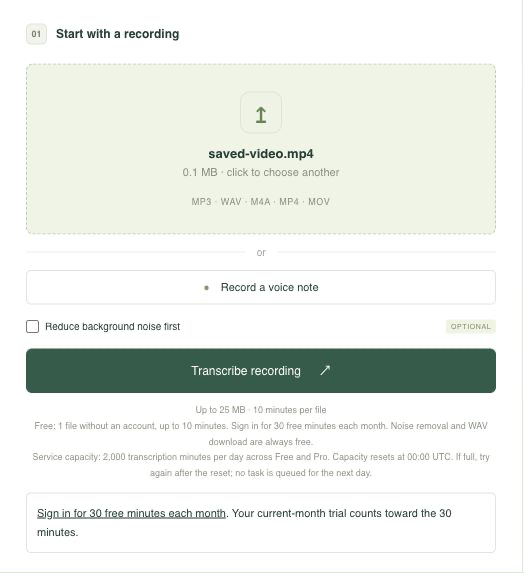
The image shows a local MP4 selected in the shared uploader. This demonstration uses an 11-second public speech recording, not a video fetched from Instagram.
This excerpt comes from an earlier completed transcription of the sample. It illustrates SRT output, not guaranteed accuracy for your recording.
1
00:00:00,000 --> 00:00:11,000
And so, my fellow Americans, ask not what your country can do for you, ask what you can do for your country.
Compare the words and timing with your own clip before using the subtitle file.
A Reel in your Saved collection is a reference to a post, not necessarily a local MP4. Start with your own video export or an allowed copy already on your phone or computer. If you only have a link, ask the owner for the file instead of submitting that URL here.
You do not give DictoText your Instagram password or account access. The tool reads only the recording you select. A silent clip, screenshot or video containing only on-screen text will not produce a useful speech transcript.
A spoken explanation can be useful as a searchable note or a draft for captions. Transcription does not copy the post description, translate visual text or identify speakers automatically. Check the original clip when a sentence is unclear.
Export reviewed text as TXT or DOCX. Use SRT or VTT in a compatible editor when you need timed captions, and check the result in that editor. DictoText does not upload a subtitle file to Instagram, replace the audio track, or return a newly captioned Reel.
Transcribe a saved TikTok video ↗ · Reduce background noise before transcription ↗
Working with another video format? transcribe video to text from a file you own or have permission to process.
For your own spoken product demo, use the transcript to check the description or draft captions in your editor. For a clip you are allowed to study, copy a short passage into your notes and retain the source attribution. Review all generated text before sharing it.
More details about working with your recordings.
No. Direct Instagram link import is not supported. Upload a saved MP4 or MOV file you own or have permission to process.
A saved-post bookmark is not the video file. Use a video already on your device, your own original export, or a copy supplied with permission by the owner. DictoText does not open your collection or download private posts.
Free: 1 file without an account, up to 10 minutes. Sign in for 30 free minutes each month. Noise removal and WAV download are always free. Your current-month anonymous trial counts toward the 30 minutes. Free minutes reset on the first of each month at 00:00 UTC and do not roll over. Daily transcription capacity: Free shares 1,500 minutes; Pro has a separate 1,500-minute pool, independent of the free pool. Both reset at 00:00 UTC. If your pool is full, try again after the reset; no task is queued for the next day.
No. The transcript comes from audible speech in the uploaded video. It does not extract the post description, comments or text shown only on screen. Music-heavy or overlapping speech may be transcribed poorly.
A saved video file with a supported audio track can be uploaded. Original audio files: Free up to 25 MB and 10 minutes; Pro up to 100 MB and 60 minutes. Videos up to 500 MB, with the same plan duration limits; each prepared audio part up to 25 MB. Direct Story fetching is not supported.
DictoText exports text, documents and separate SRT/VTT subtitle files. It does not return a video with embedded captions or post to Instagram. Review and add subtitles in your own compatible editor.
Your next idea is already in there.
Let’s get it into words.