Save an allowed video
Use your original video file, or the TikTok app’s Share → Save video option when the creator allows downloads. If saving is unavailable, ask the owner for the file. A copied post link cannot be uploaded here.
Upload a saved TikTok video to get editable text and timestamps. Videos up to 500 MB, 10 minutes on Free or 60 minutes with Pro; each prepared audio part is limited to 25 MB. Direct TikTok link import is not supported.
Original audio files: Free up to 25 MB and 10 minutes; Pro up to 100 MB and 60 minutes. Videos up to 500 MB, with the same plan duration limits. Each prepared audio part is limited to 25 MB. The original video is not uploaded. Browser decoding support is required.
Free: 1 file without an account, up to 10 minutes. Sign in for 30 free minutes each month. Noise removal and WAV download are always free.
Daily transcription capacity: Free shares 1,500 minutes; Pro has a separate 1,500-minute pool, independent of the free pool. Both reset at 00:00 UTC. If your pool is full, try again after the reset; no task is queued for the next day.
Checking your plan…
Good things start with a word.
Your transcript appears here.
Upload a recording to get started.
Start with a video file you own or have permission to process. You do not need to connect your TikTok account to DictoText.
Use your original video file, or the TikTok app’s Share → Save video option when the creator allows downloads. If saving is unavailable, ask the owner for the file. A copied post link cannot be uploaded here.
Choose the saved MP4 or MOV above, then click Transcribe recording. Your browser extracts the audio; the prepared audio is sent for transcription. The original video is not uploaded.
Check names, numbers and timing against the clip. Edit the transcript, copy the words, or download TXT, DOCX, SRT or VTT. Import subtitle files into your editor separately.
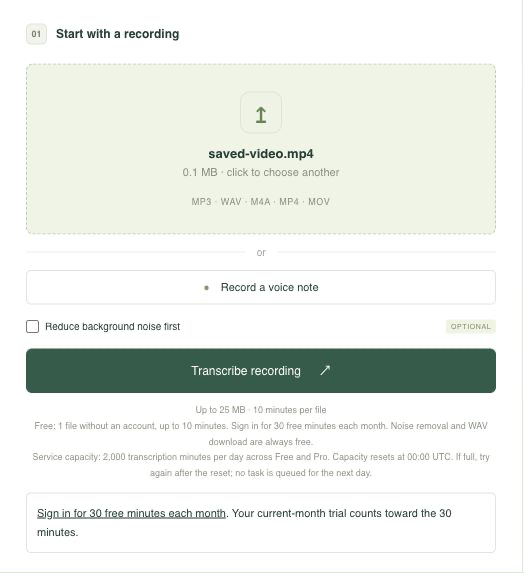
The image shows a local MP4 selected in the shared uploader. This demonstration uses an 11-second public speech recording, not a video fetched from TikTok.
This excerpt comes from an earlier completed transcription of the sample. It illustrates SRT output, not guaranteed accuracy for your recording.
1
00:00:00,000 --> 00:00:11,000
And so, my fellow Americans, ask not what your country can do for you, ask what you can do for your country.
Compare the words and timing with your own clip before using the subtitle file.
This tool starts with the file on your device. It cannot fetch a public or private TikTok URL, log in to TikTok, or copy a published caption track. For your own clips, keep the original export so you can work with a clearer source and retain a local copy.
If someone else owns the recording, obtain permission to process it. A missing download option is not something DictoText can work around. You can still use a file the owner supplies directly.
Generated segments include times from the uploaded audio. Turn on timestamps to locate a phrase, and edit any mistaken words before exporting. Names, slang, rapid speech and background music can all affect the result.
TXT is useful for plain notes and DOCX for a reviewed document. SRT and VTT keep segment timing for compatible editors. Captions are not burned into the video; line breaks and timing may need adjustment before you publish.
TikTok’s official video download instructions ↗
Transcribe a saved Instagram Reel ↗ · Reduce background noise before transcription ↗
Working with another video format? transcribe video to text from a file you own or have permission to process.
For a short how-to clip, keep the spoken instructions as editable notes or use timestamps to find a quote. For your own video, review the transcript before using it as the basis for captions. Transcription does not grant permission to republish another creator’s work.
More details about working with your recordings.
No. Direct TikTok link import is not supported. Upload a saved video file you own or have permission to process.
The creator may not allow downloads. Use your own original file or ask the owner for a copy you are allowed to process. DictoText cannot fetch the post or bypass download restrictions.
Free: 1 file without an account, up to 10 minutes. Sign in for 30 free minutes each month. Noise removal and WAV download are always free. Your current-month anonymous trial counts toward the 30 minutes. Free minutes reset on the first of each month at 00:00 UTC and do not roll over. Daily transcription capacity: Free shares 1,500 minutes; Pro has a separate 1,500-minute pool, independent of the free pool. Both reset at 00:00 UTC. If your pool is full, try again after the reset; no task is queued for the next day.
Yes, if the saved file contains audible speech. DictoText transcribes the audio rather than copying TikTok captions. It does not read text shown only on screen or reliably separate speech from loud music.
Upload MP4 or MOV containing an audio track your browser can decode. Original audio files: Free up to 25 MB and 10 minutes; Pro up to 100 MB and 60 minutes. Videos up to 500 MB, with the same plan duration limits; each prepared audio part up to 25 MB. A smaller file may still fail if its audio codec is unsupported.
No. SRT and VTT are separate subtitle files. Review their wording and timing, then use a compatible video editor to add captions. DictoText does not burn captions into video or publish to TikTok.
Your next idea is already in there.
Let’s get it into words.